Bank reconciliation is one of the tools used by accountants. It is an efficient control tool for the Bank accounts: it allows you to know the real situation of the treasury.
The software helps you in this reconciliation work. This page explains how you can perform your reconciliation for your entire fiscal year.
The Bank Reconciliation tool is available in the Accounting feature (Path: Accounting > Bank Reconciliation).
This article covers the following points:
👉 Download our Bank Reconciliation guide
How to perform a bank reconciliation
Let's take a concrete case.
You have received your bank statement for the month of January 2022. This statement lists all the bank transactions that took place between January 1, 2022 and January 31, 2022. According to this statement, the bank balance at the end of the month is $2000.
You, therefore, want to perform your bank reconciliation for the month of January, to verify the consistency of the accounting data entered in the tool for this month. To do this, follow the steps below:
Step 1- Set up your January statement
First of all, you will have to inform the tool that you are going to work on a reconciliation that covers your entire January bank statement, i.e. from 01/01/2022 to 01/31/2022. To do this, follow the steps below:
1 - Go to the Reconciliation page (Accounting > Bank > Reconciliation)
2 - You arrive on this page.
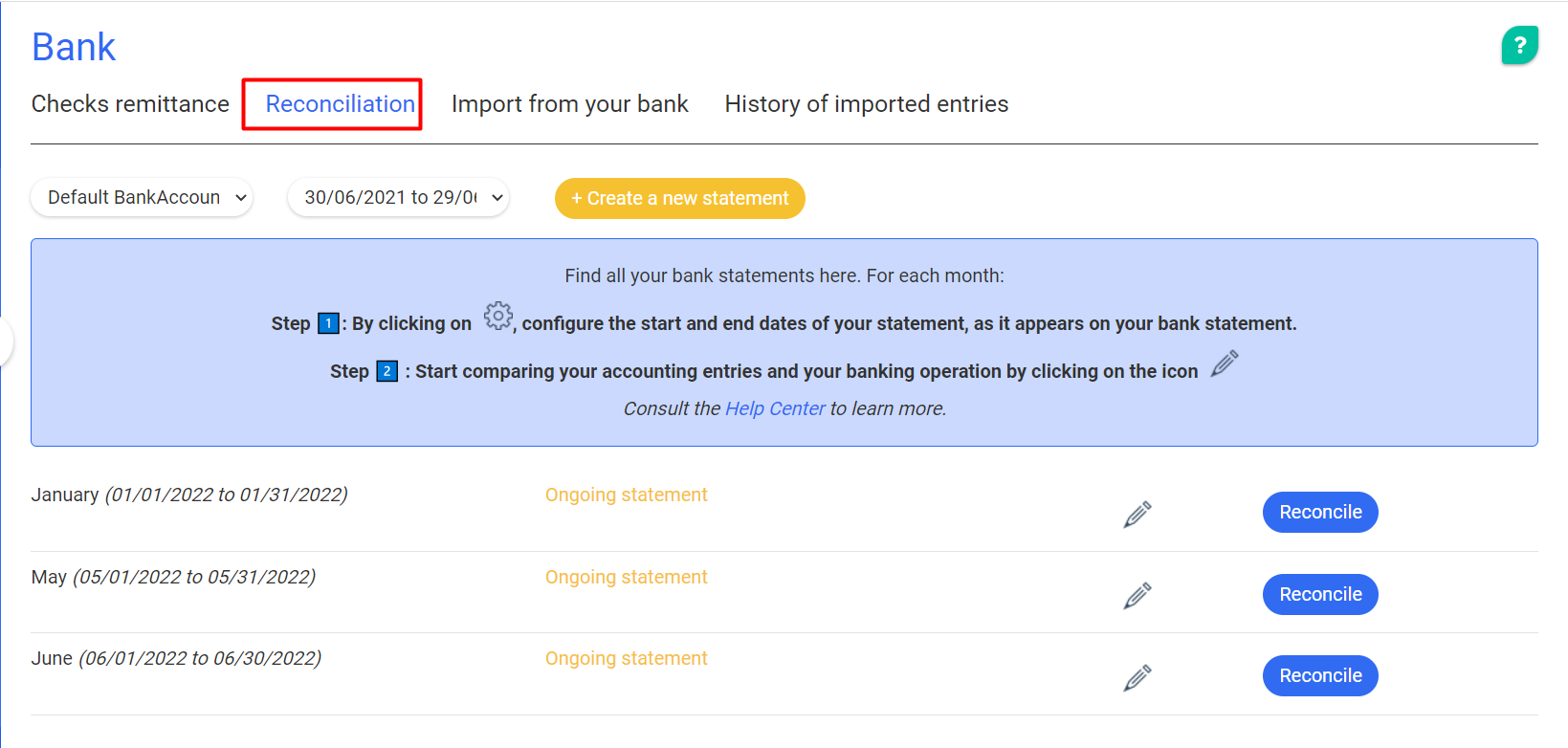
3 - You will have to set up the January 2022 statement by clicking on the wheel in front of January. A block is displayed below the wheel.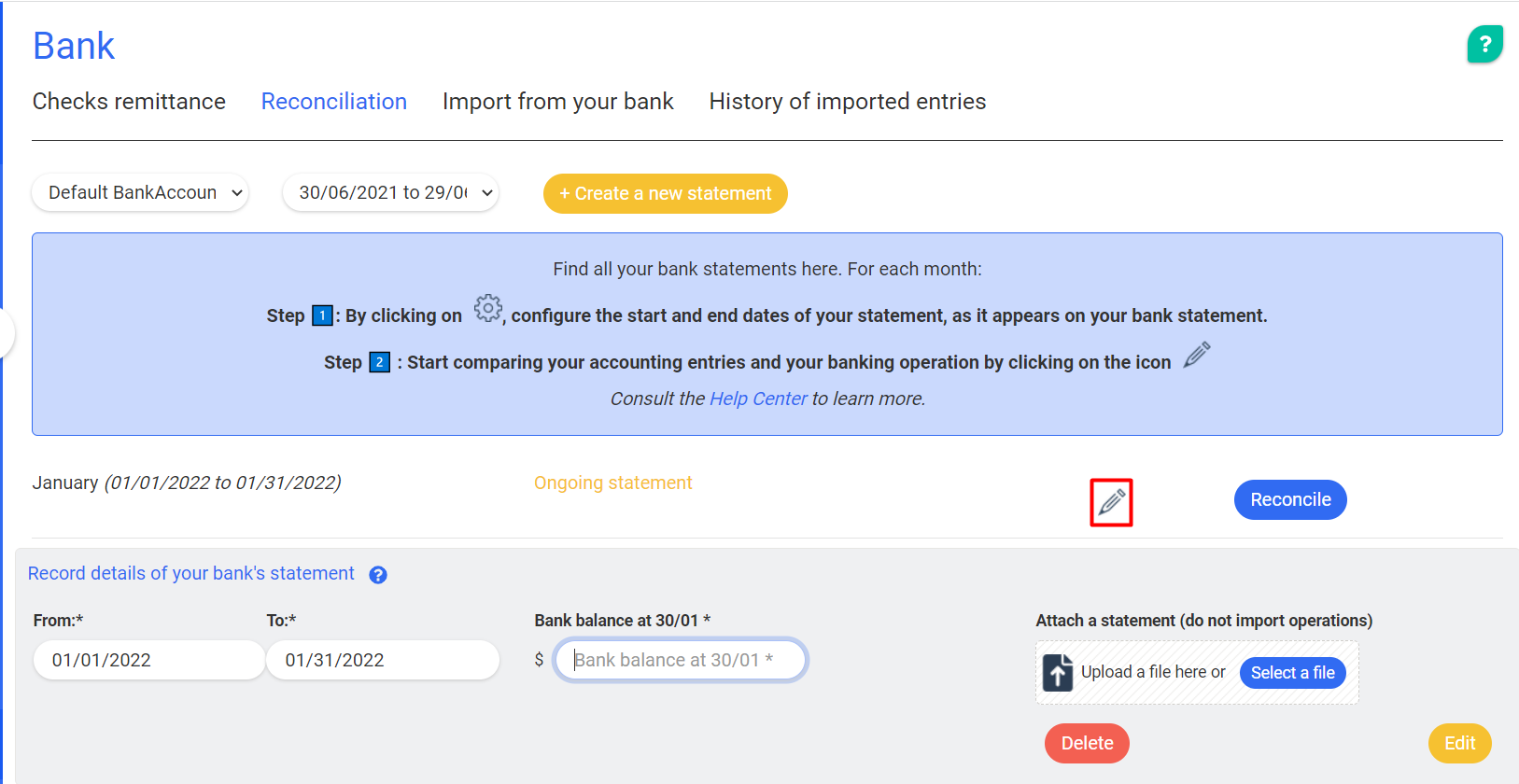
4 - Fill in several information in this block:
- The statement period if not already done: The period must cover the period indicated on your bank statement (here, it will be from January 01 to January 31).
- Your bank balance as of 31/01/2022 (amount shown on your statement): This will allow the tool to calculate the difference between the bank balance and the balance of the accounts in the Accounting
- Optionally, your paper statement that you scanned or retrieved from your banking interface. This step is optional, but is nevertheless very practical: you keep a history of your statements in the tool.
5 - Once you have done this, save and click on the "pencil" icon in front of the January statement. You can go on to the next step: the reconciliation for the month of January
Step 2 - The reconciliation
This step will be different depending on the reconciliation method you use: reconciliation with bank transaction import or reconciliation without import. To learn more about importing your bank data into the tool, see the article How to choose the reconciliation method?
- Reconcile if you import your bank transactions
- Reconcile if you do not import your bank transactions
Reconcile with imported bank transactions
If you import the bank transactions into the tool, the reconciliation will work like this.
1 - You are on the reconciliation page for the month of January 2022.
On the left, you have the list of bank transactions that have been imported into the tool for the period of January 2021. On the right, you have the list of accounting entries that you have entered for this month of January.
2 - Start your reconciliation. On the left, you take a bank transaction and on the right, you look for its "sister", i.e. the accounting entry linked to the bank transaction.
Important: It is possible that, depending on the way you have entered your entries, several entries are linked to one and the same transaction.
3 - Once you have found this entry, you can click on "Reconcile". These reconciled elements will then be considered as good and will be added to the "Pointed" block at the bottom of the page
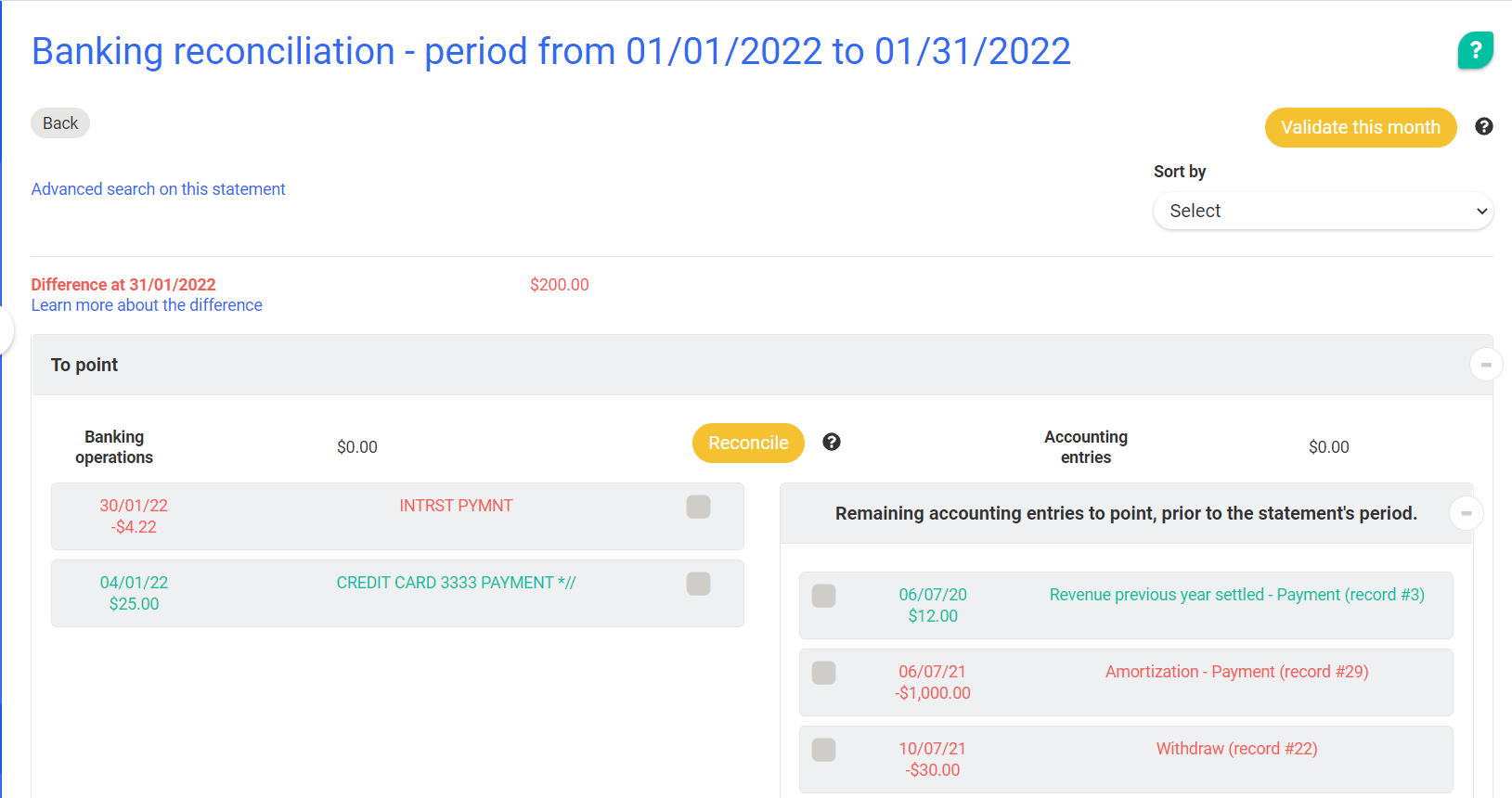
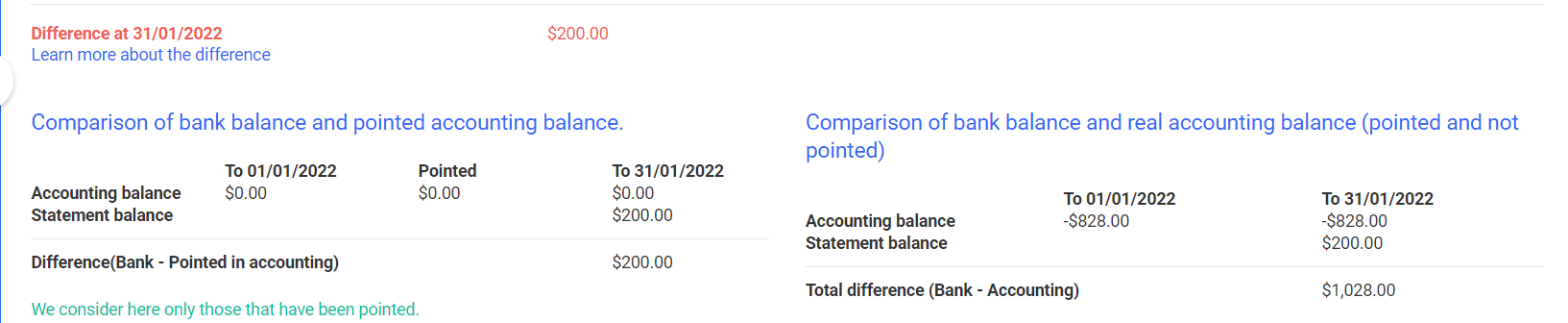
4 - You can repeat the operation for all the entries and bank transactions displayed on this page. As you fill in your entries, the difference between the balance in accounting and the balance in the bank should be close to 0.
You can check this difference directly on the page in the control section at the top of the page.
Reconcile without importing bank transactions
If you do not import the bank transactions into the tool, the reconciliation will work as follows
1 - You are on the reconciliation page for the month of August 2022.
On this page, you will see, in the "to be checked" block, the accounting entries for August 2022 that you need to work on. In the "checked" block you will see the accounting entries that you have checked, i.e. that you have considered as reconciled.
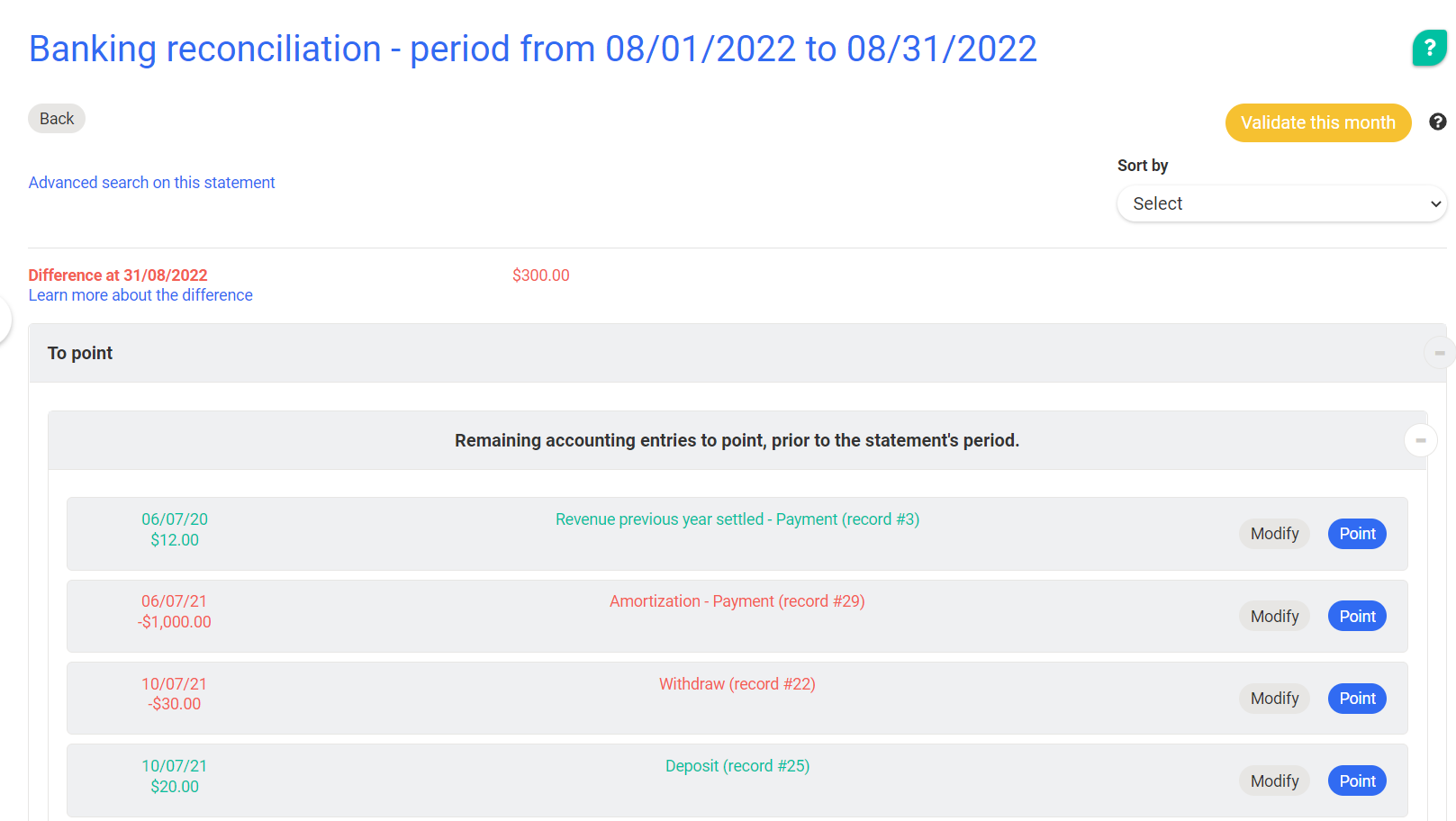
2 - Take your paper statement with you.
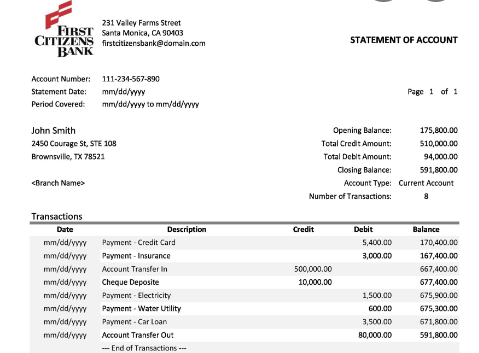
3 - Compare each line of your bank statement with the list of entries that appear on your reconciliation tool, and - each time you find the transaction recorded in the right amount and on the right date - click on "checked". This entry will then be considered as appearing on the statement.
4 - You can repeat the operation for the other entries displayed on this page and all the bank transactions on your statement. As you make your entries, the difference between the balance in the accounts and the balance in the bank should approach 0.
You can check this difference directly on the page in the control section at the top of the page.
Step 3 - Validate the statement
Once the accounting balance and the bank balance are identical, your interface will look like this:
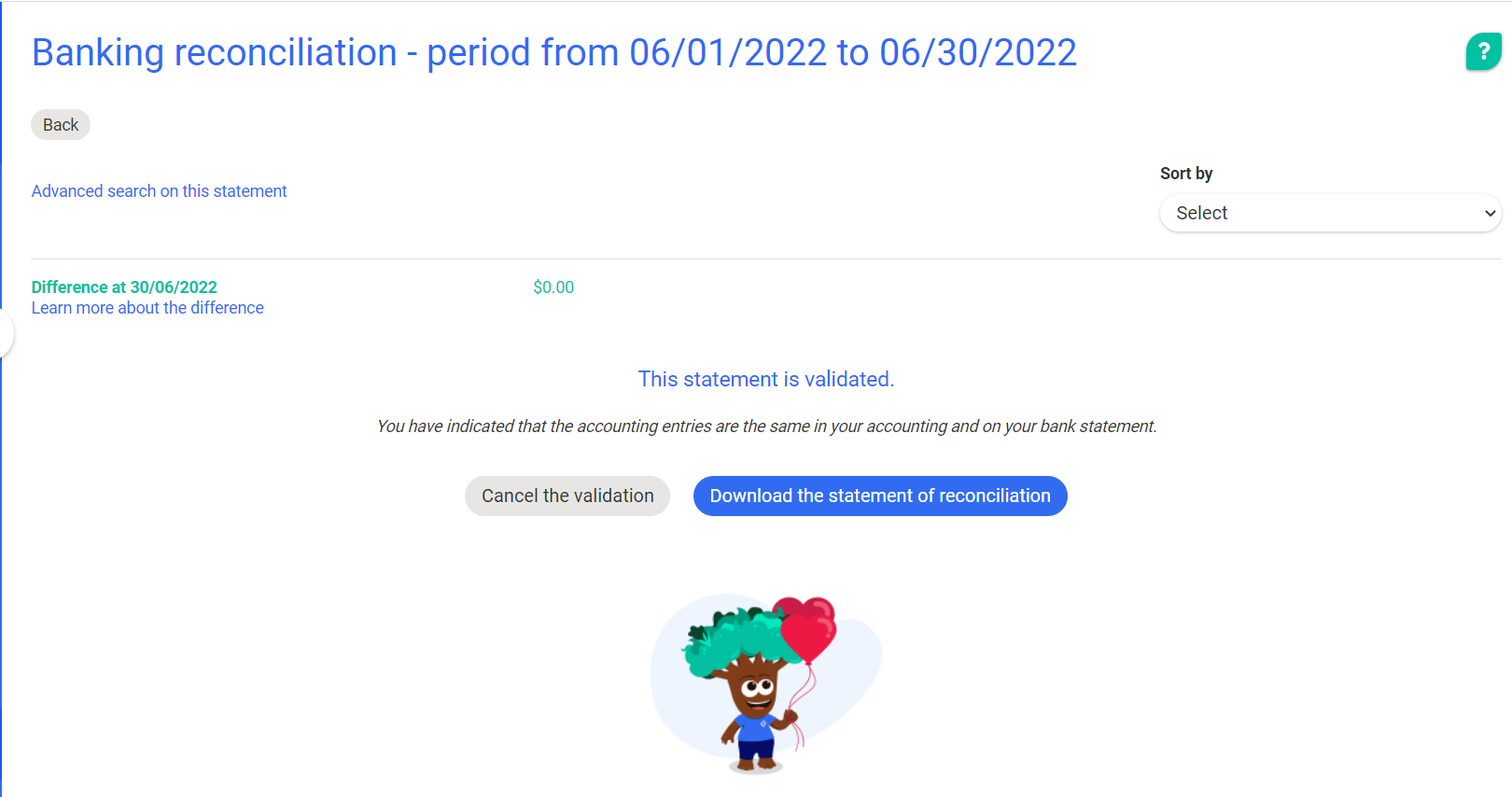
The difference between the bank and the accounting is $0, and the balance in the accounting is the same as the balance in the bank (you can consult the details of the transactions on this statement by clicking on "Details").
You can therefore consider your reconciliation exercise on this statement as validated.
To do this, click on "Validate".
Once the reconciliation is validated, you can then download the reconciliation statement for this period and print it to keep track of it.
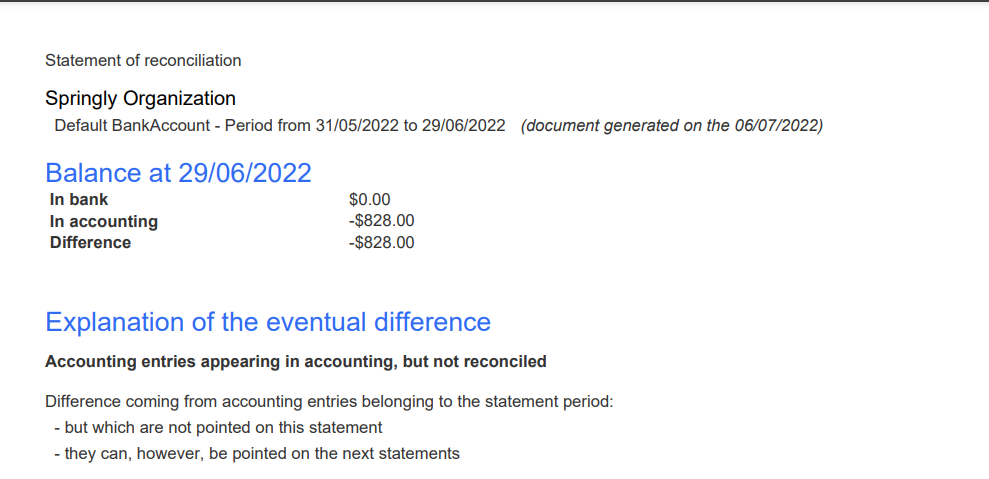
This will allow you to begin your reconciliation on the other statements.
Reconciliation history
Do I have to start all my reconciliation from the beginning?
You start using the accounting software during the year and you don't know how to proceed with the bank reconciliation: do I have to take back the whole reconciliation history? Can I start my reconciliation only from the current month?
To answer your question, you have to take into account that reconciliation is a control tool for your accounting. Therefore, we advise you to start your reconciliation only from a certain month if you are sure that the balance recorded in the accounting before that date is good.
Example: You want to start your reconciliation work on 01/01/2022. You must be sure that the balance in the accounting is good on 31/12/2021.
If this balance is not correct, this error will follow you throughout your accounting period.
To avoid any errors, we recommend that you do this reconciliation exercise on a monthly basis for the current fiscal year.
You start your reconciliation during the year: how do you proceed?
You decide to start your reconciliation during the year. In order that the unreconciled entries recorded at a date prior to your start of reconciliation do not hinder your reconciliation, you can reconcile them at the same time.
Let's take an example: You are working on a calendar accounting period (January 1 to December 31). You want to start your reconciliation work on 06/01/2022.
To do this, reconcile the entries prior to 01/06/2022 on a large statement that covers the period 01/01/2021 to 31/05/2021.
Then create a new statement from 01/06/2021 to 30/06/2021, and begin your reconciliation work.
From this reconciliation month, you can perform your bank reconciliation as described in this article.
Comments
0 comments
Article is closed for comments.